> ## Documentation Index
> Fetch the complete documentation index at: https://docs.solana.vanna.finance/llms.txt
> Use this file to discover all available pages before exploring further.
# Copilot
> Ask about your account or describe a change in plain English. Every write still needs your wallet signature.
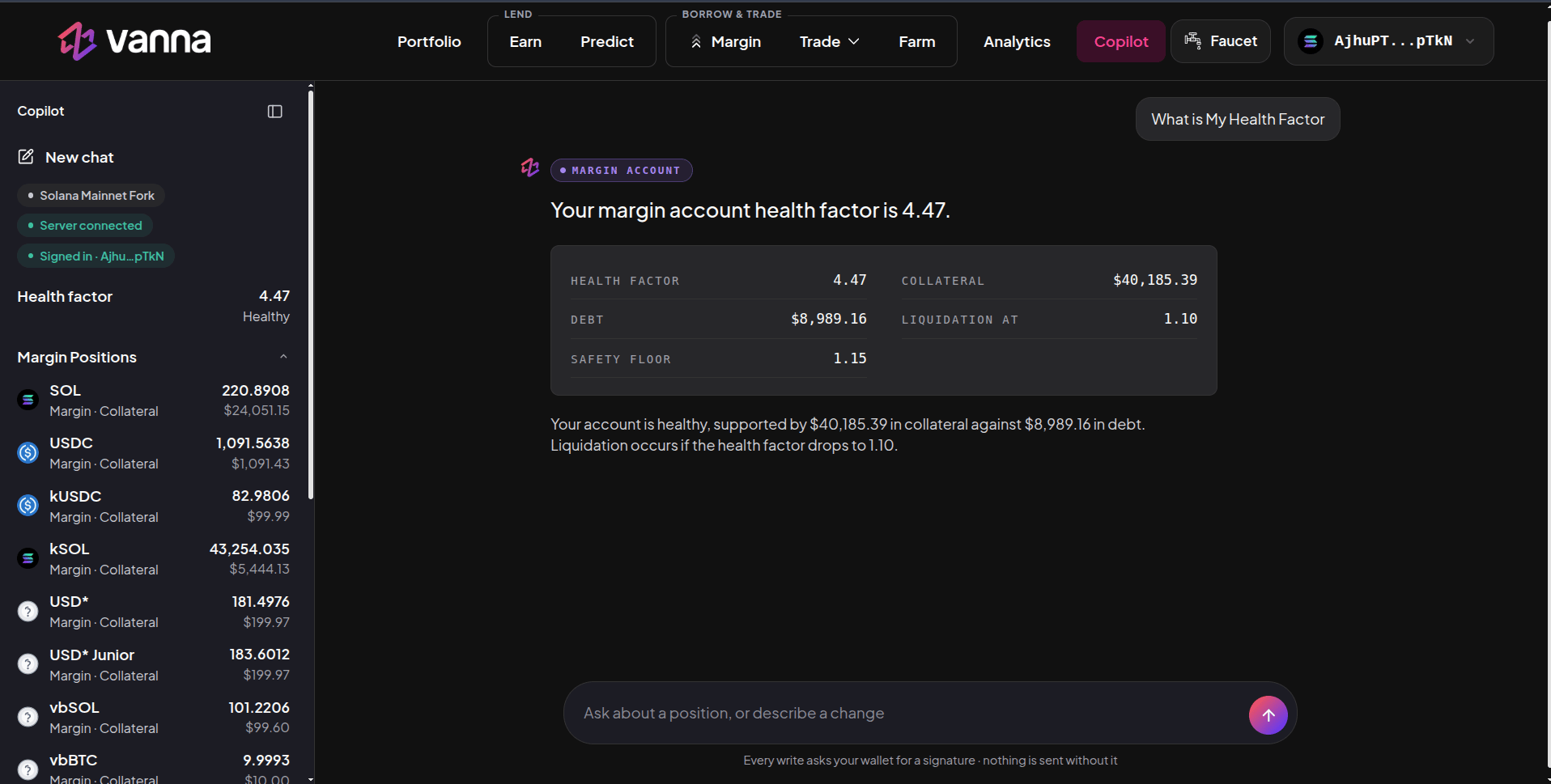
**Copilot** is an AI assistant that knows your Vanna account. Ask it questions ("What is my health factor?", "What am I earning on Farm?") or describe something you want to do ("Borrow 500 USDC", "Move 100 USDC into USD\*"), and it answers with live numbers or prepares the transaction for you.
 ## Getting started
1. Open **Copilot** in the header with your wallet connected.
2. **Sign in** by signing a short login message in your wallet (no transaction, no fee).
3. Type in the box at the bottom: *Ask about a position, or describe a change*.
The sidebar shows your network, the server connection, who's signed in, your health factor and your margin positions. **New chat** starts a fresh conversation.
## What it can do
| Ask | Example |
| - | - |
| **Read your account** | "What's my health factor?", "Show my positions", "How much do I owe?" |
| **Explain** | "Why did my health factor drop?", "What is USD\* Junior?" |
| **Plan a change** | Deposit, withdraw, borrow, repay, swap, lend on Earn, deposit into or withdraw from a vault, buy or sell on Predict: "Borrow 1,000 USDC", "Swap 5 SOL to USDC", "Deposit 200 USDC into BTC Basis", "Repay my USDT" |
| **Markets** | "Which perps markets are open?", "Show Predict markets", "What does the Delta-Neutral list pay?" (perps orders are previewed; place them on the Perps page) |
Answers come as cards with the exact figures (for example health factor, collateral, debt, liquidation level and safety floor).
## Safety
* **Nothing is sent without you.** Every write shows a preview and asks your wallet for a signature. If you don't sign, nothing happens.
* Copilot uses the same health checks and safety floor as the rest of the app, and there are limits on how large a single action and a day's actions can be.
* It reads the same live chain data as the app, so its numbers match the Margin and Portfolio pages.
Copilot can make mistakes in how it reads a request. Always check the preview (amount, asset, direction and health factor after) before you sign.
This documentation is built and hosted on [Mintlify](https://mintlify.com), a developer documentation platform.
## Getting started
1. Open **Copilot** in the header with your wallet connected.
2. **Sign in** by signing a short login message in your wallet (no transaction, no fee).
3. Type in the box at the bottom: *Ask about a position, or describe a change*.
The sidebar shows your network, the server connection, who's signed in, your health factor and your margin positions. **New chat** starts a fresh conversation.
## What it can do
| Ask | Example |
| - | - |
| **Read your account** | "What's my health factor?", "Show my positions", "How much do I owe?" |
| **Explain** | "Why did my health factor drop?", "What is USD\* Junior?" |
| **Plan a change** | Deposit, withdraw, borrow, repay, swap, lend on Earn, deposit into or withdraw from a vault, buy or sell on Predict: "Borrow 1,000 USDC", "Swap 5 SOL to USDC", "Deposit 200 USDC into BTC Basis", "Repay my USDT" |
| **Markets** | "Which perps markets are open?", "Show Predict markets", "What does the Delta-Neutral list pay?" (perps orders are previewed; place them on the Perps page) |
Answers come as cards with the exact figures (for example health factor, collateral, debt, liquidation level and safety floor).
## Safety
* **Nothing is sent without you.** Every write shows a preview and asks your wallet for a signature. If you don't sign, nothing happens.
* Copilot uses the same health checks and safety floor as the rest of the app, and there are limits on how large a single action and a day's actions can be.
* It reads the same live chain data as the app, so its numbers match the Margin and Portfolio pages.
Copilot can make mistakes in how it reads a request. Always check the preview (amount, asset, direction and health factor after) before you sign.
This documentation is built and hosted on [Mintlify](https://mintlify.com), a developer documentation platform.