> ## Documentation Index
> Fetch the complete documentation index at: https://docs.solana.vanna.finance/llms.txt
> Use this file to discover all available pages before exploring further.
# Kamino Lending
> Supply SOL, USDC or USDT from your margin account to Kamino and earn its supply APY.
Kamino is Solana's largest lending market. From Farm you supply margin-account tokens to Kamino's main market and receive Kamino **receipt tokens** (kSOL, kUSDC, kUSDT) that grow as Kamino borrowers pay interest.
 ## Supply
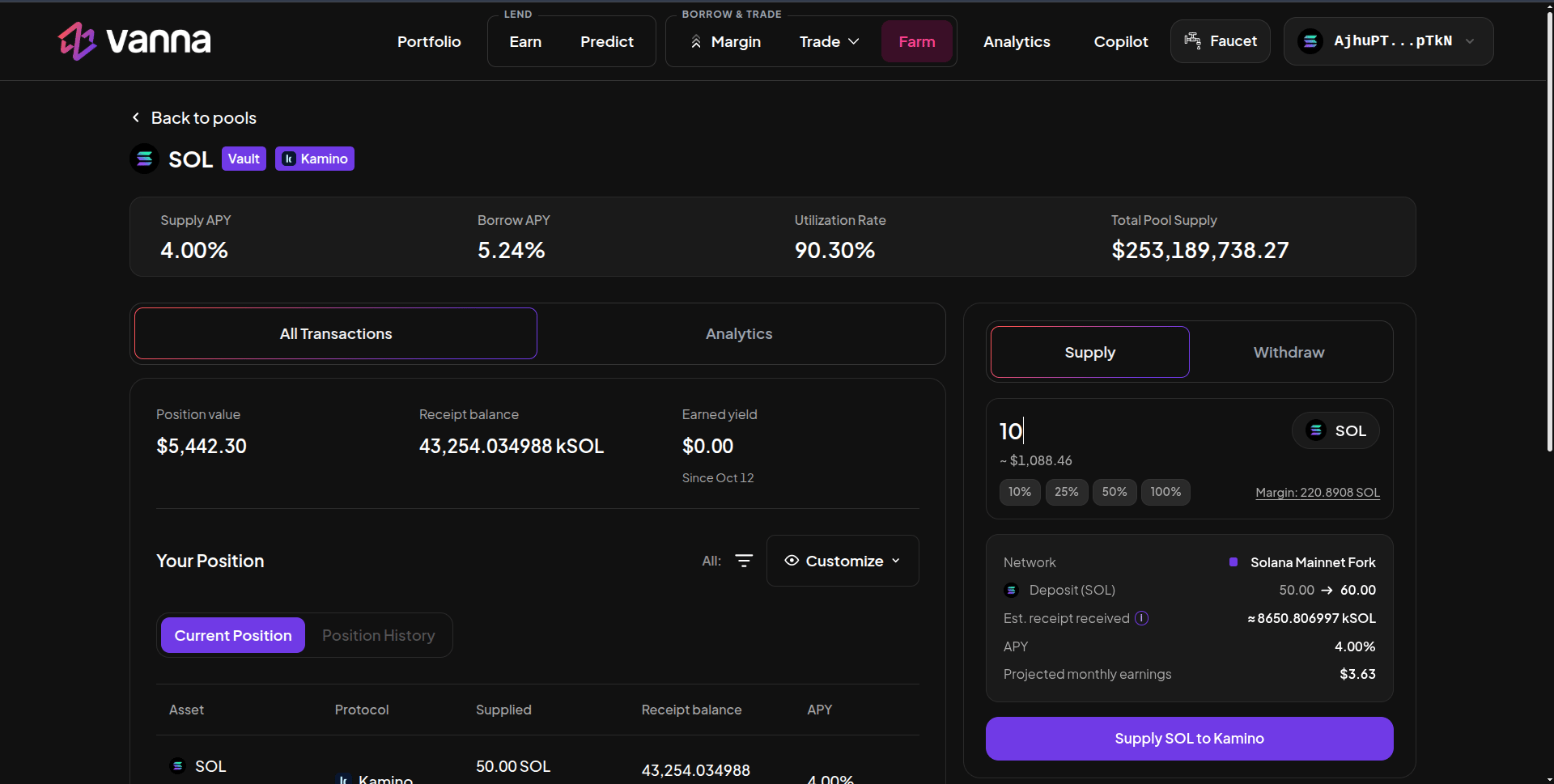
On **Farm → Lending / Single Assets**, click SOL, USDC or USDT with the **Kamino** badge.
In **Supply**, type an amount or use the % chips. **Margin** shows what your margin account holds of that token. Need more? Deposit or borrow on [Margin](/guides/margin/overview) first.
The details box shows the network, your deposit before → after, the **Est. receipt received** (kSOL…), the APY and projected monthly earnings.
Click **Supply SOL to Kamino** and approve. The receipt lands in your margin account.
## Withdraw
Switch to **Withdraw**, choose a percentage of your position and confirm. The receipt is redeemed and the underlying token returns to your margin account. [Flash repay](/guides/margin/repay#flash-repay) also redeems every Kamino receipt automatically.
## The numbers
| Field | Meaning |
| - | - |
| **Supply APY / Borrow APY** | Kamino's live rates for that reserve |
| **Utilization Rate** | How much of Kamino's reserve is borrowed |
| **Total Pool Supply** | Size of Kamino's reserve |
| **Receipt balance** | Your kSOL / kUSDC / kUSDT. It's a share of the reserve, so the number is much larger than the underlying it's worth |
| **Earned yield** | What your position has earned since your first deposit |
## Leveraged Kamino
Borrow on Margin, then supply here: you earn Kamino's supply APY on the borrowed amount and pay Vanna's borrow APY on it. It's profitable while Kamino's supply rate is above Vanna's borrow rate for that asset. Watch both, since both move with utilization.
This documentation is built and hosted on [Mintlify](https://mintlify.com), a developer documentation platform.
## Supply
On **Farm → Lending / Single Assets**, click SOL, USDC or USDT with the **Kamino** badge.
In **Supply**, type an amount or use the % chips. **Margin** shows what your margin account holds of that token. Need more? Deposit or borrow on [Margin](/guides/margin/overview) first.
The details box shows the network, your deposit before → after, the **Est. receipt received** (kSOL…), the APY and projected monthly earnings.
Click **Supply SOL to Kamino** and approve. The receipt lands in your margin account.
## Withdraw
Switch to **Withdraw**, choose a percentage of your position and confirm. The receipt is redeemed and the underlying token returns to your margin account. [Flash repay](/guides/margin/repay#flash-repay) also redeems every Kamino receipt automatically.
## The numbers
| Field | Meaning |
| - | - |
| **Supply APY / Borrow APY** | Kamino's live rates for that reserve |
| **Utilization Rate** | How much of Kamino's reserve is borrowed |
| **Total Pool Supply** | Size of Kamino's reserve |
| **Receipt balance** | Your kSOL / kUSDC / kUSDT. It's a share of the reserve, so the number is much larger than the underlying it's worth |
| **Earned yield** | What your position has earned since your first deposit |
## Leveraged Kamino
Borrow on Margin, then supply here: you earn Kamino's supply APY on the borrowed amount and pay Vanna's borrow APY on it. It's profitable while Kamino's supply rate is above Vanna's borrow rate for that asset. Watch both, since both move with utilization.
This documentation is built and hosted on [Mintlify](https://mintlify.com), a developer documentation platform.