

Steps

  1. Open Farm.
  2. Pick Deposit & Deploy.
  3. Choose a stock or PreStock and an amount.
  4. Set leverage from 1× to 5×.
  5. Read the breakdown: deposit, borrow, Kamino supply APY, Vanna borrow APR, projected net.
  6. Confirm. Wait for the Position tab to show the receipt.
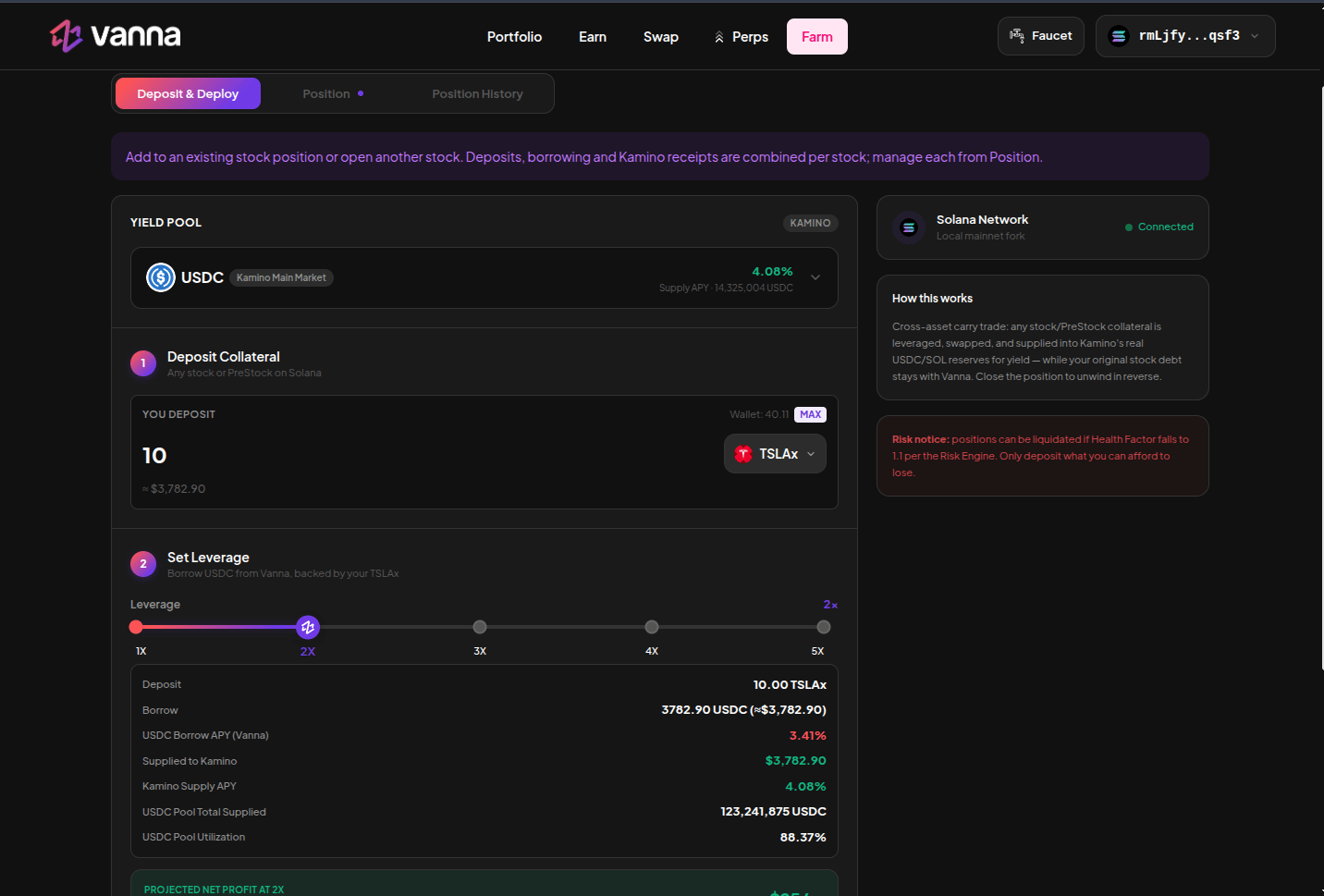
One-click leveraged yield form for TSLAx into Kamino USDC

One-click ticket. 10 TSLAx, 2×, borrow USDC, supply Kamino main USDC. Click the image to zoom.

What “one-click” means

The app builds the required instructions (create margin if needed, deposit, borrow, swap, Kamino supply, Lite bookkeeping) and sends them so you are not clicking five protocols. Solana transactions are atomic within one signature. If the app must split a later reduce/unwind, an earlier confirmed step stays. Health is checked on the way in. A preview that would print HF ≤ 1.1 is rejected. Adding to an existing stock position increases that stock’s Lite receipt. Opening a second stock creates a second position. Manage each from Positions.